
10 Best Contract Management Software for Startups & Small Business (2026)
Transparency note: This content is written by the team at Bind. We are building what we believe is among the most complete AI CLMs available for startups, and we review competitors below against the same criteria. Our assessments of the other tools are based on their published documentation, pricing pages and public review themes rather than our own deployments.
This guide is specifically for startups and small businesses (under 100 employees). For mid-market companies, see Best CLM for Mid-Market. For enterprise, see Best Enterprise Contract Management Software. For a comprehensive comparison across all tiers, see 13 Best Contract Management Software.
If you are a startup founder or small business owner, managing contracts in Google Docs and email threads is probably starting to break down. Maybe you missed a renewal deadline. Maybe you spent an afternoon hunting for an NDA someone saved in the wrong folder. Maybe your sales team is closing deals faster than your process can keep up.
You are not alone. Most startups hit this wall between 20 and 100 contracts. The search for a proper tool gets overwhelming fast. Enterprise options cost more than your entire software budget. Free tools feel held together with duct tape. Every vendor's marketing makes their product sound like the only choice.
This guide cuts through the noise. We build Bind, and we assessed the other tools from their published documentation, pricing pages and public review themes rather than from our own deployments. We compared real pricing (not "starting at" numbers in footnotes), and evaluated them for how startups actually work: fast, lean, often remote or distributed, and without a dedicated legal team. Whether you are a solo founder sending your first NDA or a growing team that needs to professionalize, this guide will help you find the right fit.
Key Takeaways (TL;DR)
- Best Overall for Startups: Bind - our own product, built to replace 4-5 separate tools with one platform, starting at $90/seat/month
- Best for Enterprise: Ironclad - powerful, custom-quoted (Vendr reports contracts at a median of about $40,000/year across 363 purchases (range $15,000-$104,272))
- Best for Sales Teams: PandaDoc - Great for proposals, oriented toward sales rather than legal workflows
- Best Free Option: Google Docs + Spreadsheets - Works until you hit 50+ contracts
- Biggest Trend in 2026: AI-assisted drafting is now table stakes, not a premium feature
Quick Comparison Table (2026)
| Tool | G2 Rating | Setup Time | Price | Free Trial | Best For |
|---|---|---|---|---|---|
| Bind | Not yet rated | Days, in our own deployments | $90/seat/mo | Demo | AI contracts made simple |
| Ironclad | 4.5/5 | No published timeline - ask for a scoped schedule | Custom (Vendr median ~$40K/yr) | Demo only | Enterprise workflow engine |
| PandaDoc | 4.7/5 | Self-serve signup | $19-35/user/mo (Starter) | 14 days | Sales proposals that close |
| Juro | 4.7/5 | No published timeline - ask for a scoped schedule | Custom (Vendr median ~$31,164/yr) | Demo only | Modern contract collaboration |
| SpotDraft | 4.6/5 | No published timeline - ask for a scoped schedule | Custom (Vendr median ~$25,278/yr) | Demo only | Legal ops automation |
| Concord | 4.2/5 | Self-serve signup | $499/mo (5 users incl.) | 14 days | Straightforward and predictable |
| Agiloft | 4.6/5 | No published timeline - ask for a scoped schedule | Custom (Vendr median ~$67,132/yr) | Free tier | Infinitely customizable |
| ContractPodAi | 4.5/5 | No published timeline - ask for a scoped schedule | Custom-quoted (no published rate card) | Demo only | Enterprise AI powerhouse |
| DocuSign CLM | 4.3/5 | No published timeline - ask for a scoped schedule | Custom quote | Demo only | Docusign ecosystem extension |
| Google Docs | n/a | Instant | Free | Always free | Quick and dirty solution |
(G2 ratings as displayed on g2.com at the time of writing. None of these vendors publishes an implementation timeline, so no duration is shown for them - get a scoped schedule in writing. Custom-quoted platforms publish no rate card; the medians shown come from Vendr's purchasing data, and vendors Vendr does not cover are shown as custom-quoted.)
Table of Contents
- What to Look for in Startup CLM Software
- Bind - Best Value AI CLM
- Ironclad - Best for Enterprise
- PandaDoc - Best for Sales Proposals
- Juro - Best for Mid-Market
- SpotDraft - Best for Legal Ops
- Concord - Best Budget Option
- Agiloft - Best for Custom Workflows
- ContractPodAi - Best Enterprise AI
- DocuSign CLM - Best for DocuSign Users
- Google Docs - Best Free Option
- Frequently Asked Questions
What to Look for in Startup CLM Software
Here is what actually matters for startups and small businesses. The CLM market is crowded. Most comparison guides target enterprise buyers. But startup priorities are fundamentally different. You need something that works out of the box. Does not eat your runway. Does not require a three-month implementation before you can send a single contract.
Must-Haves
Transparent pricing should be non-negotiable. If a vendor hides pricing behind "talk to sales," the annual cost is usually well above what startups can justify. You want to know exactly what you pay before you commit. Be aware that a published price and a self-serve signup are different things: several vendors publish full pricing and still route every button to a demo.
Quick setup matters as much as features. The best startup CLM is one you can use within an hour. Not one requiring weeks of onboarding. If your team needs training to send a basic NDA, the tool is built for a different company.
A solid template library saves you from starting every contract from scratch. It also means you avoid expensive legal fees for routine documents. Look for pre-built NDAs, MSAs, employment agreements, and service contracts you can customize. Our contract templates guide covers what to look for in detail.
Built-in e-signatures eliminate the cost and hassle of a separate signing tool. If your CLM already signs natively, a second per-seat signing subscription on top of it is spend worth auditing - Docusign's published eSignature plans run $25-$40 per user per month on Standard and Business Pro (annual billing, checked August 2026). Many modern platforms include e-signatures natively.
Nice-to-Haves
AI drafting is remarkably capable in 2026. It saves hours on first drafts and contract explanations. Not a must-have for every startup. But once you describe what you need in plain English and get a complete contract in seconds, manual drafting feels slow.
Approval workflows become useful once more than a handful of people touch contracts. If your co-founder, a sales lead, and an advisor need to review deals, structured approval keeps things orderly.
Integrations with your CRM, communication tools, and storage round out the picture. Salesforce, HubSpot, and Slack connections are most common. They save your team from copying information between systems.
Red Flags
Watch out for vendors that hide pricing entirely. "Contact us for pricing" usually signals a five-figure annual contract - Vendr's purchasing data puts the medians for the custom-quoted CLM platforms between roughly $17,000 and $67,000 a year - which is rarely justifiable for a startup still finding product-market fit. Ask for the entry tier and the price in writing before you rule a vendor in or out.
Minimum seat requirements are worth asking about explicitly. Some enterprise platforms package a floor number of seats, which means paying for capacity you will not use for years. Not every vendor does this and few publish it, so put the question directly to your rep.
Be cautious of long implementation timelines. None of the enterprise vendors here publishes one, so ask for a scoped schedule in writing rather than a rule of thumb. If onboarding is a configuration project that needs its own project manager, the tool was designed for large organizations, and a startup pays for that in lost momentum.
1. Bind - Best Value AI CLM
Best for: Teams that want contracts built around agentic AI rather than traditional workflow software - you define the playbook and the agents draft, review, and negotiate against it. That suits small teams and enterprises alike, and startups get published pricing instead of a sales call.
Bind is the tool we're building, so we'll be upfront about that. But here's why we think it deserves the #1 spot for startups:
What Makes Bind Different
Unlike traditional CLMs with complex interfaces and steep learning curves, Bind uses a conversational AI-native interface. Just tell Bind what you need - "Create an NDA with Acme Corp for a 2-year term" - and get a complete, legally-vetted contract in seconds. No menus to navigate, no forms to fill out.
Key Features
- Conversational AI drafting - Just describe what you need, get a complete contract
- 300+ ready-to-use templates - NDAs, MSAs, employment agreements, and more - all customizable
- Tabula view - Unique table view to see all contracts with custom columns. Find any information instantly, compare contracts side-by-side
- Embedded eSigning - E-signatures built directly into contracts, no separate tool needed
- Plain English explanations - Hover over any clause to understand what it means
- ISO 27001 and SOC 2 Type I certified — Enterprise-grade security from day one
- Demo available
Pricing
| Plan | Price | Features |
|---|---|---|
| Starter | $90/seat/mo | Built-in templates, AI drafting, 25 eSigns/mo, 100 contract storage, Bind API |
| Business | $500/mo | Includes 5 users (+$90/user), 500 signatures/month, AI negotiation, playbooks, integrations |
| Enterprise | Custom | Advanced controls, custom integrations, dedicated support |
Business Tier: Automated Negotiation
For growing teams, Bind's Business tier includes a unique negotiation view with automatic redline resolving. Set your playbook once - acceptable terms, fallback positions, deal-breakers - and Bind's AI applies it automatically to incoming redlines.
Verdict
If you want modern AI features at startup-friendly pricing, Bind is purpose-built for you. The conversational interface means zero learning curve - if you can chat, you can create contracts. Slush, one of Europe's largest startup events, manages hundreds of sponsor, vendor, and speaker contracts through Bind each year. The main limitation is that it's newer than enterprise competitors, so fewer prebuilt connectors: Salesforce is native, and other tools such as HubSpot connect through the Bind API, a REST API with public documentation, which is included on every plan.
Get a demo → Get a demo
2. Ironclad - Best for Enterprise
Best for: Large companies with dedicated legal teams and complex approval workflows.
Ironclad is one of the most established enterprise CLM platforms and a Leader in the 2025 Gartner Magic Quadrant for Contract Life Cycle Management. Its depth suits Series C+ startups or companies with 500+ employees; smaller teams should check whether they would actually use the workflow configuration they are paying for. See our Ironclad pricing breakdown for the full cost picture.
 Screenshot via G2
Key Features
- Workflow Studio - Visual editor for complex approval chains
- AI Assist - Suggests edits and identifies risks
- Deep integrations - Salesforce, Slack, and most enterprise tools
- Repository search - Find any clause across thousands of contracts
- Compliance features - SOC 2, GDPR, and industry-specific compliance
Pricing
Ironclad publishes no rate card. Vendr's purchasing data reports contracts at a median of about $40,000/year across 363 purchases (range $15,000-$104,272). The bands below are our own modelled buckets built from that purchasing data, not vendor list prices - get a quote before budgeting against them.
| Company Size | Modelled estimate |
|---|---|
| 50-200 employees | Low-to-mid five figures per year |
| 200-1000 employees | Mid-to-high five figures per year |
| 1000+ employees | Six figures per year |
(Our own modelled buckets, built from Vendr's Ironclad purchasing data, August 2026. Ironclad does not publish pricing.)
Verdict
Ironclad is excellent, and it is built around the workflows of companies that have legal teams rather than founders doing their own contracts. Ironclad publishes no implementation timeline. Expect a configuration project rather than a switch-on, with dedicated resources assumed, and get a scoped schedule in your evaluation. Pre-Series B, check how much of the configuration depth you would actually use before committing.
Reviews & Recognition
- G2: 4.5/5 (270 reviews) | Capterra: 4.4/5 (57 reviews)
- Gartner Magic Quadrant Leader for CLM (2023, 2024, 2025 - 3 consecutive years)
- Notable customers: L'Oreal, Dropbox, Mastercard, OpenAI, Salesforce, Zoom, Asana, Canva
3. PandaDoc - Best for Sales Proposals
Best for: Sales teams who need beautiful proposals with built-in signing.
PandaDoc sits between a proposal tool and a CLM. Excellent for sales-driven documents. Less suited for complex legal contracts.
 Screenshot via G2
Key Features
- Drag-and-drop editor - Create visually appealing proposals
- Content library - Reusable blocks for pricing tables, case studies
- CRM integrations - Native Salesforce, HubSpot, Pipedrive connections
- Payment collection - Accept payments directly in documents
- Real-time notifications - Know when prospects open documents
Pricing
| Plan | Price | Notes |
|---|---|---|
| Free | $0 | E-sign only, no templates |
| Starter | $19/user/mo annual ($35 month-to-month) | Templates, basic analytics |
| Business | ~$49/user/mo annual | CRM integrations, approval workflows |
| Enterprise | Custom | API access, advanced security |
(Per PandaDoc's published pricing as of August 2026.)
Verdict
PandaDoc is strong for sales proposals and straightforward agreements. Its AI centers on editor writing assistance and document Q&A rather than legal-specific contract drafting or playbook review, and legal-oriented capabilities such as clause libraries, multi-round redlining, and risk analysis sit in add-ons and higher tiers rather than the core plans. Great for sales; check the legal workflows you need against the specific plan you would buy.
Reviews & Recognition
- G2: 4.7/5 (3,340+ reviews) | Capterra: 4.5/5 (1,230 reviews)
- G2 Leader in E-Signature, Proposal, Contract Management, and CPQ
- Notable customers: JPMorgan Chase, Target, Workday
4. Juro - Best for Mid-Market
Best for: Mid-sized companies (100-500 employees) who need a balance of features and usability.
Juro positions itself as "the contract collaboration platform." It offers a cleaner UX than traditional enterprise tools.
 Screenshot via Juro
Key Features
- In-browser editing - No Word downloads required
- AI Assist - Risk identification and clause suggestions
- Collaborative negotiation - Real-time editing with counterparties
- Contract repository - Searchable database of all agreements
- Slack integration - Approve contracts without leaving Slack
Pricing
Juro publishes no rate card. Per Vendr's purchasing data, the median Juro contract is about $31,164/year (range $11,976-$132,339). The bands below are our own modelled buckets placed against that data, not vendor list prices:
| Tier | Our modelled bucket |
|---|---|
| Entry | Near the low end of Vendr's range, ~$11,976/year |
| Mid | Near Vendr's median of ~$31,164/year |
| Enterprise | Toward the top of Vendr's range, up to ~$132,339/year |
(Our own modelled buckets, built from Vendr's Juro purchasing data, August 2026. Confirm on juro.com.)
Verdict
Juro is a strong choice for mid-market companies. More modern than Ironclad. More features than basic tools. The main consideration for startups: the median Juro contract in Vendr's data sits well above the published-price options in this guide.
Reviews & Recognition
- G2: 4.7/5 (35+ reviews) | Capterra: 4.8/5 (39 reviews)
- Among the highest-rated CLMs on G2 for ease of use and support at the time of writing
- Notable customers: Deliveroo, Trustpilot, Remote
5. SpotDraft - Best for Legal Ops
Best for: Companies with dedicated legal operations teams who want workflow automation.
SpotDraft focuses on the "operations" side of contract management. Tracking obligations. Managing renewals. Building automated workflows.
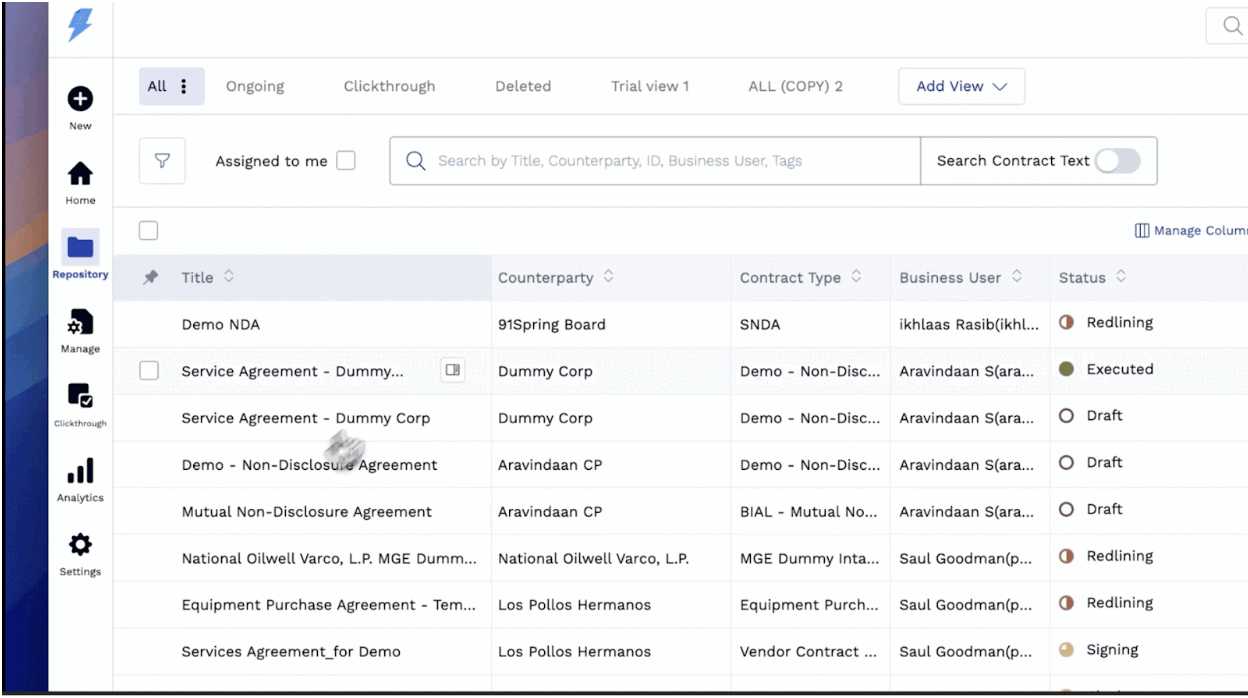 Screenshot via G2
Key Features
- Obligation tracking - Never miss a renewal or deadline
- Workflow automation - Build complex approval chains
- AI review - Automatic redlining against your playbook
- Analytics dashboard - Track cycle times and bottlenecks
- Multi-language support - Good for international companies
Pricing
SpotDraft publishes no rate card. Per Vendr's purchasing data, the median SpotDraft contract is about $25,278/year (range $8,280-$30,307).
Verdict
SpotDraft is excellent for legal teams that need operational rigor. Implementation generally assumes dedicated resources, and much of its depth is aimed at a legal ops function - if you do not have one yet, you may not use it.
Reviews & Recognition
- G2: 4.6/5 (157 reviews) | Capterra: 4.8/5 (26 reviews)
- Fast Company Most Innovative Companies 2024 (only CLM on the list)
- Notable customers: Airbnb, Notion, Strava
6. Concord - Best Budget Option
Best for: Small businesses that want straightforward CLM on a predictable, published price.
Concord is one of the few CLMs that publishes its pricing outright, and its 2026 model is a $499 per month regardless of headcount. It covers the core lifecycle well, and it introduced an AI tier (Horizon / AI Copilot) in 2026.
 Screenshot via G2
Key Features
- E-signatures included (confirm any volume limits on your plan)
- Template library covering the standard contract types
- Version control to track changes across negotiations
- Google Drive integration to sync with your existing storage
- Reporting with analytics on contract status
- AI capabilities via the Horizon / AI Copilot tier introduced in 2026
Pricing
| Plan | Price | Notes |
|---|---|---|
| Concord | $499/mo (5 users incl.) | Published 2026 pricing, headcount-independent |
| AI tier (Horizon / AI Copilot) | Confirm in quote | AI capabilities introduced in 2026 |
(Per Concord's published 2026 pricing. Confirm plan inclusions and any AI-tier surcharge in your quote.)
Verdict
Concord is solid if you want something more capable than Google Docs on a published, predictable price. The main consideration for a very small team: at $499/month flat it costs more than a one- or two-seat per-user plan, so it pays off once several people need access. Check whether the AI capabilities you want sit in the base plan or the 2026 AI tier.
Reviews & Recognition
- G2: 4.2/5 (133 reviews) | Capterra: 4.5/5 (134 reviews)
- Capterra Top 20 Most Popular Contract Management Software
- 1,500+ customers including Vecna Robotics, GreenSlate, Denison University
7. Agiloft - Best for Custom Workflows
Best for: Companies with unique, complex contract workflows who need maximum flexibility.
Agiloft is infinitely customizable. That is both its strength and weakness. You can build almost any workflow. But it requires significant setup time.
 Screenshot via G2
Key Features
- No-code workflow builder to create any process you can imagine
- AI contract analysis that extracts and categorizes clauses
- Compliance management to track regulatory requirements
- Free tier that's limited but functional for small teams
- On-premise option for security-conscious organizations
Pricing
| Tier | Price |
|---|---|
| Free | $0 (up to 10 users, limited features) |
| Professional | Custom |
| Enterprise | Custom |
(Agiloft publishes no rate card. Per Vendr's purchasing data, the median Agiloft contract is about $67,132/year, range $62,629-$80,344.)
Verdict
Agiloft is powerful but requires a dedicated admin. The free tier is legitimately useful for very small teams. Scaling up means significant investment in configuration.
Reviews & Recognition
- G2: 4.6/5 (92 reviews) | Capterra: Top 5 rated (38 reviews)
- Gartner Magic Quadrant Leader for CLM (6 consecutive years: 2020-2025)
- Agiloft's own published materials cite a 99.6% implementation success rate and 97% customer retention
- Notable customers: CDW, Roche, BISSELL, TaylorMade
8. ContractPodAi - Best Enterprise AI
Best for: Large enterprises who want the most advanced AI capabilities.
ContractPodAi is an enterprise-grade platform with some of the most advanced AI features on the market.
 Screenshot via G2
Key Features
- Leah for natural language contract queries
- Automatic data extraction to pull key terms from any document
- Risk scoring with AI-powered risk assessment
- M&A due diligence for bulk contract review
- Microsoft integration with deep Office 365 connectivity
Pricing
Enterprise only. ContractPodAi is custom-quoted, publishes no rate card, and is not covered by the public purchasing datasets - get the figure in writing before you shortlist it.
Verdict
ContractPodAi is built for companies managing thousands of contracts with enterprise-grade AI needs. Its enterprise scope and rollout effort put it outside what most startups and SMBs would take on.
Reviews & Recognition
- G2: 4.5/5 (47 reviews) | Capterra: 4.5/5 (19 reviews)
- Gartner Magic Quadrant Visionary for CLM (5 consecutive years: 2021-2025)
- Notable customers: PwC, KPMG, Cushman & Wakefield, Braskem America
9. DocuSign CLM - Best for DocuSign Users
Best for: Companies already using DocuSign who want to add contract management.
DocuSign CLM grew out of the SpringCM enterprise workflow platform (acquired 2018), with AI capabilities integrated over successive releases - the Iris AI engine announced in 2025, followed by AI agents for review, intake, redlining, and obligation tracking.
Key Features
- Native Docusign eSignature integration, so signed agreements flow into the CLM repository automatically
- Agreement actions to automate post-signature workflows
- Clause library to standardize language across contracts
- Salesforce integration with native connection for sales contracts
- AI capabilities via the Iris engine and Docusign's IAM products
- Mobile app to review and approve on the go
Pricing
Custom-quoted; Docusign publishes no rate card for CLM. Vendr's purchasing data reports $20K-$60K/year for 10-25 users, $60K-$200K for 25-100, and $200K-$500K+ above that. For smaller teams, Docusign also sells published-price IAM plans (~$45-$80/user/month) and CLM Essentials, which is positioned at growing small and midsize businesses.
Verdict
If you are already invested in Docusign, adding CLM keeps signing and lifecycle management under one vendor with a single audit trail. Starting fresh, compare the tier you would actually be quoted - including the published-price IAM plans and CLM Essentials - against the other platforms here rather than against the headline enterprise figures.
Reviews & Recognition
- G2: 4.3/5 (412 reviews) | Capterra: 4.4/5 (116 reviews)
- Gartner Magic Quadrant Leader for CLM (6 consecutive years through 2025)
- 1,800+ CLM customers per Docusign's published materials | named by Newsweek as a top-ranked trustworthy software company
- Notable customers: NVIDIA, Deloitte, Uber, Capital One, Salesforce, Unilever
10. Google Docs - Best Free Option
Best for: Pre-product startups with fewer than 50 contracts total.
Sometimes the best solution is the simplest. Google Docs + Google Drive can work for very early-stage companies.
"Features"
- Free - Can't beat the price
- Collaboration - Real-time editing with anyone
- Comments - Basic negotiation via comments
- Folders - Organize by client, type, or status
- Search - Find contracts by keyword
The Catch
You will quickly outgrow this setup. Limitations compound as volume grows. Searching inside documents is painfully slow across dozens of agreements. Version control is limited to "Version history," which gets confusing when multiple people edit during a negotiation.
No built-in e-signatures. You need a separate tool like DocuSign or HelloSign. That adds cost and another system to manage. No renewal tracking. You rely on calendar reminders or memory. No reporting or analytics. You have no visibility into contract cycle times, bottlenecks, or deals stuck in negotiation.
Verdict
Google Docs is a reasonable starting point for your first 20-50 contracts. Especially if you are bootstrapped. But be honest about when you outgrow it. Time spent searching for contracts, tracking renewals manually, and juggling email threads with signed PDFs will eventually cost more than a CLM subscription. Both in hours and missed opportunities.
Conclusion: Which CLM Should You Choose?
After testing all ten tools, here is the simple framework we would recommend.
If you are bootstrapped with fewer than 50 contracts, start with Google Docs. It is free, everyone knows how to use it, and you do not need to add complexity before you have the volume to justify it. Put that money toward product development instead.
Once you are a growing startup that wants one tool for everything, Bind at $90/seat/month gives you AI drafting, e-signatures, templates, and contract management in a single platform, on a published price rather than a custom quote. In our own deployments it goes live in days rather than months, because the AI learns your playbook and templates instead of requiring manual workflow configuration.
If you are a mid-market company with a legal team, Juro or SpotDraft offer the collaborative workflows and obligation tracking that in-house lawyers need, and Vendr's purchasing data puts both well below the top end of the enterprise CLM platforms.
For enterprises with complex compliance and approval needs, Ironclad or ContractPodAi are the established leaders, and their pricing reflects the depth of their capabilities.
And if your primary use case is sales proposals with built-in signing, PandaDoc is hard to beat for that specific workflow.
The biggest mistake we see companies make is buying enterprise software too early. A five-figure annual CLM contract - which is where Vendr's purchasing data puts the medians for the custom-quoted platforms - makes sense when you have a dedicated legal team and hundreds of contracts flowing through your organization. It is harder to justify when you are a three-person team doing your own contracts and trying to preserve runway. Start with what fits your stage today - and since several of these vendors sell smaller entry tiers that are not on their marketing front page, ask for the specific plan and price before you rule anything in or out.
Ready to simplify your contracts?
See how Bind helps teams manage contracts from draft to signature in one platform.
Frequently asked questions
- What is CLM software?
- Contract Lifecycle Management (CLM) software helps businesses create, negotiate, sign, and manage contracts through their entire lifecycle. Instead of drafting in Word, signing via email, and burying documents in folders, a CLM centralizes everything into one platform. Modern CLM tools include template libraries, e-signatures, AI-assisted drafting, and analytics. The best ones in 2026 go further. They use AI to generate contracts from plain-language descriptions. They flag risky clauses automatically. They track renewal dates and compliance deadlines. Think of a CLM as the operating system for your company's agreements. Everything organized, searchable, and actionable.
- How much does contract management software cost?
- The pricing range is surprisingly wide. Free options like Google Docs cover the most basic needs. Enterprise platforms such as ContractPodAi and Ironclad are custom-quoted and publish no rate card; Vendr's purchasing data reports Ironclad contracts at a median of about $40,000/year across 363 purchases (range $15,000-$104,272). For a detailed breakdown across the entire market, see our CLM pricing guide. For startups and small businesses, the published-price options are the clearest starting point: PandaDoc from $19 per user per month billed annually ($35 month-to-month), Bind at $90 per seat per month for a full AI-powered CLM, and Concord at a $499 per month. The custom-quoted platforms typically require annual contracts and often involve implementation fees. Match your spend to your actual volume and complexity - and ask each vendor for the entry tier rather than assuming the headline enterprise figure applies to you.
- Do I need CLM software if I only have 10 contracts?
- Probably not. That is an honest answer. If you manage fewer than 50 contracts total with no compliance requirements, Google Docs with organized folders works fine. No reason to add a subscription when your setup is not causing problems. That said, there are clear signals to invest. You lose track of renewal dates and discover auto-renewed contracts. Multiple people collaborate on contracts and you drown in "v3finalFINAL" file names. You pay separately for e-signatures and wish they connected to your drafting. Slow contract turnaround drags out your sales cycles. When these happen, a CLM pays for itself quickly.
- What's the difference between CLM and e-signature software?
- This is one of the most common points of confusion, especially for startups that started with DocuSign or HelloSign and are wondering whether they need something more. E-signature software focuses on a single step in the contract process: getting documents signed electronically. It does that step well, but it does not help you draft the contract, negotiate changes, track obligations after signing, or analyze your contract portfolio. CLM software covers the entire journey. It includes e-signatures as one feature among many - alongside template libraries, AI-assisted drafting, redlining and negotiation tools, searchable contract repositories, renewal tracking, and analytics. Think of it this way: e-signature software is the stamp at the end of the process, while CLM software is the entire assembly line. Most modern CLMs include e-signatures natively, which means you can often eliminate your separate signing tool and save that subscription cost.
- Is AI contract drafting accurate?
- AI drafting in 2026 is remarkably capable for standard contracts like NDAs, MSAs, and employment agreements. For these routine documents, AI-generated drafts are typically on par with what a junior lawyer would produce - and they are ready in seconds rather than hours. The technology has matured significantly over the past two years, and AI-assisted drafting is now considered table stakes rather than a premium feature. That said, AI should assist rather than replace legal review for complex or high-stakes agreements. If you are negotiating a partnership that represents a significant portion of your revenue, or drafting terms that involve unusual liability structures, you still want a qualified lawyer to review the final document. The best AI tools, including Bind, are transparent about this. They explain their suggestions in plain English, show you exactly what each clause means, and let you verify everything before sending. The goal is to handle 80% of your contracts without legal involvement and route the remaining 20% to a lawyer who can focus on the details that actually matter.
Bind is trusted by legal teams across Europe and the US









