
10 Best Contract Management Software for Startups & Small Business (2026)
Transparency note: This content is written by the team at Bind. We are building the most feature-complete AI CLM on the market, and we objectively review competitors below. We've tested each tool and present honest assessments of their strengths and weaknesses.
If you are a startup founder or small business owner, managing contracts in Google Docs and email threads is probably starting to break down. Maybe you missed a renewal deadline. Maybe you spent an afternoon hunting for an NDA someone saved in the wrong folder. Maybe your sales team is closing deals faster than your process can keep up.
You are not alone. Most startups hit this wall between 20 and 100 contracts. The search for a proper tool gets overwhelming fast. Enterprise options cost more than your entire software budget. Free tools feel held together with duct tape. Every vendor's marketing makes their product sound like the only choice.
This guide cuts through the noise. We tested all ten tools, compared real pricing (not "starting at" numbers in footnotes), and evaluated them for how startups actually work: fast, lean, without a dedicated legal team. Whether you are a solo founder sending your first NDA or a growing team that needs to professionalize, this guide will help you find the right fit.
Key Takeaways (TL;DR)
- Best Overall for Startups: Bind - Most feature-complete AI CLM starting at $90/seat/month, replaces 4-5 separate tools
- Best for Enterprise: Ironclad - Powerful but requires custom pricing (typically $30K+/year)
- Best for Sales Teams: PandaDoc - Great for proposals, less focused on legal workflows
- Best Free Option: Google Docs + Spreadsheets - Works until you hit 50+ contracts
- Biggest Trend in 2026: AI-assisted drafting is now table stakes, not a premium feature
Quick Comparison Table (2026)
| Tool | Ease of Use | Setup Time | Price | Free Trial | Best For |
|---|---|---|---|---|---|
| Bind | 95% | Minutes | $90/seat/mo | Demo | AI contracts made simple |
| Ironclad | 78% | 2-3 months | ~$30K/yr | Demo only | Enterprise workflow engine |
| PandaDoc | 92% | Hours | $35/mo | 14 days | Sales proposals that close |
| Juro | 90% | 1-2 weeks | ~$15K/yr | Demo only | Modern contract collaboration |
| SpotDraft | 85% | 2-4 weeks | ~$10K/yr | Demo only | Legal ops automation |
| Concord | 82% | Hours | $17/mo | 14 days | Simple and affordable |
| Agiloft | 70% | 1-3 months | Custom | Free tier | Infinitely customizable |
| ContractPodAi | 75% | 2-4 months | ~$50K/yr | Demo only | Enterprise AI powerhouse |
| DocuSign CLM | 76% | 1-2 months | ~$25K/yr | Demo only | DocuSign ecosystem extension |
| Google Docs | 98% | Instant | Free | Always free | Quick and dirty solution |
Table of Contents
- What to Look for in Startup CLM Software
- Bind - Best Value AI CLM
- Ironclad - Best for Enterprise
- PandaDoc - Best for Sales Proposals
- Juro - Best for Mid-Market
- SpotDraft - Best for Legal Ops
- Concord - Best Budget Option
- Agiloft - Best for Custom Workflows
- ContractPodAi - Best Enterprise AI
- DocuSign CLM - Best for DocuSign Users
- Google Docs - Best Free Option
- Frequently Asked Questions
What to Look for in Startup CLM Software
Here is what actually matters for startups and small businesses. The CLM market is crowded. Most comparison guides target enterprise buyers. But startup priorities are fundamentally different. You need something that works out of the box. Does not eat your runway. Does not require a three-month implementation before you can send a single contract.
Must-Haves
Transparent pricing should be non-negotiable. If a vendor hides pricing behind "talk to sales," the annual cost is usually well above what startups can justify. You want to know exactly what you pay before you commit.
Quick setup matters as much as features. The best startup CLM is one you can use within an hour. Not one requiring weeks of onboarding. If your team needs training to send a basic NDA, the tool is built for a different company.
A solid template library saves you from starting every contract from scratch. It also means you avoid expensive legal fees for routine documents. Look for pre-built NDAs, MSAs, employment agreements, and service contracts you can customize. Our contract templates guide covers what to look for in detail.
Built-in e-signatures eliminate the cost and hassle of a separate signing tool. Paying $25-40/month for DocuSign or HelloSign on top of your CLM is unnecessary. Many modern platforms include e-signatures natively.
Nice-to-Haves
AI drafting is remarkably capable in 2026. It saves hours on first drafts and contract explanations. Not a must-have for every startup. But once you describe what you need in plain English and get a complete contract in seconds, manual drafting feels slow.
Approval workflows become useful once more than a handful of people touch contracts. If your co-founder, a sales lead, and an advisor need to review deals, structured approval keeps things orderly.
Integrations with your CRM, communication tools, and storage round out the picture. Salesforce, HubSpot, and Slack connections are most common. They save your team from copying information between systems.
Red Flags
Watch out for vendors that hide pricing entirely. "Contact us for pricing" almost always means $15,000+ per year. Rarely justifiable for a startup still finding product-market fit.
Minimum seat requirements are another warning sign. Many enterprise CLMs require 10+ seats. You pay for capacity you will not use for years. A three-person startup does not need a 10-seat minimum.
Be cautious of long implementation timelines. If onboarding takes three months and requires a project manager, the tool was designed for large organizations. Startups need to move fast. A CLM that takes a quarter to deploy works against you.
1. Bind - Best Value AI CLM
Best for: Startups, small businesses, and anyone who wants AI-powered contracts without the enterprise price tag.
Bind is the tool we're building, so we'll be upfront about that. But here's why we think it deserves the #1 spot for startups:
What Makes Bind Different
Unlike traditional CLMs with complex interfaces and steep learning curves, Bind uses a conversational AI-native interface. Just tell Bind what you need - "Create an NDA with Acme Corp for a 2-year term" - and get a complete, legally-vetted contract in seconds. No menus to navigate, no forms to fill out.
Key Features
- Conversational AI drafting - Just describe what you need, get a complete contract
- 300+ ready-to-use templates - NDAs, MSAs, employment agreements, and more - all customizable
- Tabula view - Unique table view to see all contracts with custom columns. Find any information instantly, compare contracts side-by-side
- Fastest embedded eSigning - E-signatures built directly into contracts, no separate tool needed
- Plain English explanations - Hover over any clause to understand what it means
- Demo available
Pricing
| Plan | Price | Features |
|---|---|---|
| Starter | $90/seat/mo | 300+ templates, AI drafting, 25 eSigns/mo, 100 contract storage |
| Business | $500/mo | Includes 5 users (+$90/user), unlimited eSigns, AI negotiation, playbooks, integrations |
| Enterprise | Custom | Advanced controls, custom integrations, dedicated support |
Business Tier: Automated Negotiation
For growing teams, Bind's Business tier includes a unique negotiation view with automatic redline resolving. Set your playbook once - acceptable terms, fallback positions, deal-breakers - and Bind's AI applies it automatically to incoming redlines.
Verdict
If you want modern AI features at startup-friendly pricing, Bind is purpose-built for you. The conversational interface means zero learning curve - if you can chat, you can create contracts. Slush, one of Europe's largest startup events, manages hundreds of sponsor, vendor, and speaker contracts through Bind each year. The main limitation is that it's newer than enterprise competitors, so fewer legacy integrations (though Salesforce and HubSpot are supported).
Book a demo → Book a demo
2. Ironclad - Best for Enterprise
Best for: Large companies with dedicated legal teams and complex approval workflows.
Ironclad is the gold standard for enterprise CLM. Worth the investment for Series C+ startups or companies with 500+ employees. For everyone else, it is overkill. See our Ironclad pricing breakdown for the full cost picture.
 Screenshot via G2
Key Features
- Workflow Studio - Visual editor for complex approval chains
- AI Assist - Suggests edits and identifies risks
- Deep integrations - Salesforce, Slack, and most enterprise tools
- Repository search - Find any clause across thousands of contracts
- Compliance features - SOC 2, GDPR, and industry-specific compliance
Pricing
Ironclad doesn't publish pricing. Based on our research and industry reports:
| Company Size | Estimated Cost |
|---|---|
| 50-200 employees | $30,000 - $50,000/year |
| 200-1000 employees | $50,000 - $100,000/year |
| 1000+ employees | $100,000+/year |
Verdict
Ironclad is excellent but designed for companies with legal teams. Not for founders doing their own contracts. Implementation takes 2-3 months and requires dedicated resources. Pre-Series B, you will likely pay for features you will not use for years.
Reviews & Recognition
- G2: 4.5/5 (270 reviews) | Capterra: 4.4/5 (57 reviews)
- Gartner Magic Quadrant Leader for CLM (2023, 2024, 2025 - 3 consecutive years)
- Notable customers: L'Oreal, Dropbox, Mastercard, OpenAI, Salesforce, Zoom, Asana, Canva
3. PandaDoc - Best for Sales Proposals
Best for: Sales teams who need beautiful proposals with built-in signing.
PandaDoc sits between a proposal tool and a CLM. Excellent for sales-driven documents. Less suited for complex legal contracts.
 Screenshot via G2
Key Features
- Drag-and-drop editor - Create visually appealing proposals
- Content library - Reusable blocks for pricing tables, case studies
- CRM integrations - Native Salesforce, HubSpot, Pipedrive connections
- Payment collection - Accept payments directly in documents
- Real-time notifications - Know when prospects open documents
Pricing
| Plan | Price | Notes |
|---|---|---|
| Free | $0 | E-sign only, no templates |
| Essentials | $35/mo | Templates, basic analytics |
| Business | $65/mo | CRM integrations, approval workflows |
| Enterprise | Custom | API access, advanced security |
Verdict
PandaDoc is fantastic for sales proposals and simple agreements. But it lacks legal-specific features: clause libraries, redlining, AI risk analysis. Growing companies eventually need these. Great for sales. Less great for legal ops.
Reviews & Recognition
- G2: 4.7/5 (3,340+ reviews) | Capterra: 4.5/5 (1,230 reviews)
- G2 Leader in E-Signature, Proposal, Contract Management, and CPQ
- Notable customers: JPMorgan Chase, Target, Workday
4. Juro - Best for Mid-Market
Best for: Mid-sized companies (100-500 employees) who need a balance of features and usability.
Juro positions itself as "the contract collaboration platform." It offers a cleaner UX than traditional enterprise tools.
 Screenshot via Juro
Key Features
- In-browser editing - No Word downloads required
- AI Assist - Risk identification and clause suggestions
- Collaborative negotiation - Real-time editing with counterparties
- Contract repository - Searchable database of all agreements
- Slack integration - Approve contracts without leaving Slack
Pricing
Juro doesn't publish pricing. Industry estimates:
| Tier | Estimated Cost |
|---|---|
| Starter | ~$15,000/year |
| Growth | ~$25,000/year |
| Enterprise | ~$50,000+/year |
Verdict
Juro is a strong choice for mid-market companies. More modern than Ironclad. More features than basic tools. The main drawback: pricing is still too high for most startups.
Reviews & Recognition
- G2: 4.7/5 (35+ reviews) | Capterra: 4.8/5 (39 reviews)
- #1 rated CLM for ease of use and support on G2 (9.8/10 support score)
- Notable customers: Deliveroo, Pfizer, Trustpilot, WeWork, Remote
5. SpotDraft - Best for Legal Ops
Best for: Companies with dedicated legal operations teams who want workflow automation.
SpotDraft focuses on the "operations" side of contract management. Tracking obligations. Managing renewals. Building automated workflows.
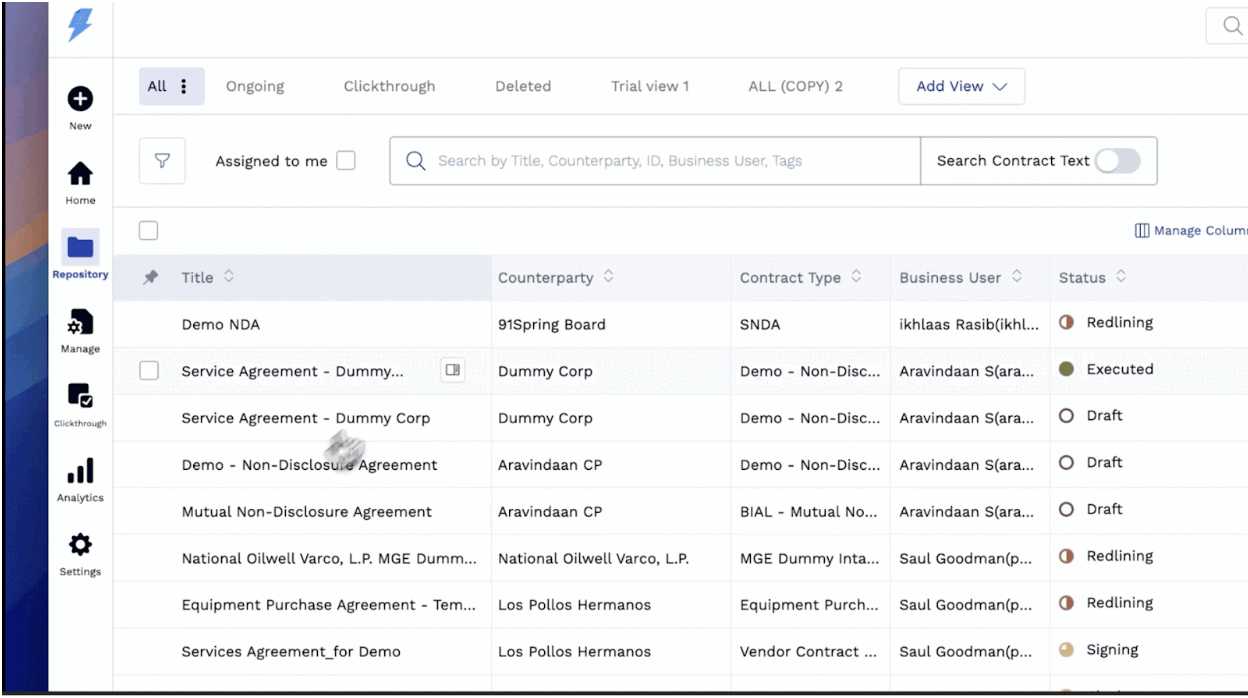 Screenshot via G2
Key Features
- Obligation tracking - Never miss a renewal or deadline
- Workflow automation - Build complex approval chains
- AI review - Automatic redlining against your playbook
- Analytics dashboard - Track cycle times and bottlenecks
- Multi-language support - Good for international companies
Pricing
Custom pricing only. Estimated ~$10,000-$25,000/year based on company size.
Verdict
SpotDraft is excellent for legal teams that need operational rigor. Implementation requires dedicated resources. Overkill for startups without a legal ops function.
Reviews & Recognition
- G2: 4.6/5 (157 reviews) | Capterra: 4.8/5 (26 reviews)
- Fast Company Most Innovative Companies 2024 (only CLM on the list)
- Notable customers: Airbnb, Notion, Strava
6. Concord - Best Budget Option
Best for: Small businesses who want basic CLM features at a reasonable price.
Concord is one of the few CLMs with transparent, affordable pricing. No AI features, but it covers the basics well.
 Screenshot via G2
Key Features
- Unlimited e-signatures included in all plans
- Template library that's basic but functional
- Version control to track changes across negotiations
- Google Drive integration to sync with your existing storage
- Reporting with basic analytics on contract status
Pricing
| Plan | Price | Notes |
|---|---|---|
| Free | $0 | 5 documents total |
| Standard | $17/mo | Unlimited docs, 1 user |
| Pro | $49/mo | Multiple users, API |
Verdict
Concord is solid if you want something better than Google Docs but cannot afford enterprise pricing. The main limitation: no AI features. You get 2020-era CLM functionality in 2026.
Reviews & Recognition
- G2: 4.2/5 (133 reviews) | Capterra: 4.5/5 (134 reviews)
- Capterra Top 20 Most Popular Contract Management Software
- 1,500+ customers including Vecna Robotics, GreenSlate, Denison University
7. Agiloft - Best for Custom Workflows
Best for: Companies with unique, complex contract workflows who need maximum flexibility.
Agiloft is infinitely customizable. That is both its strength and weakness. You can build almost any workflow. But it requires significant setup time.
 Screenshot via G2
Key Features
- No-code workflow builder to create any process you can imagine
- AI contract analysis that extracts and categorizes clauses
- Compliance management to track regulatory requirements
- Free tier that's limited but functional for small teams
- On-premise option for security-conscious organizations
Pricing
| Tier | Price |
|---|---|
| Free | $0 (up to 10 users, limited features) |
| Professional | Custom |
| Enterprise | Custom |
Verdict
Agiloft is powerful but requires a dedicated admin. The free tier is legitimately useful for very small teams. Scaling up means significant investment in configuration.
Reviews & Recognition
- G2: 4.6/5 (92 reviews) | Capterra: Top 5 rated (38 reviews)
- Gartner Magic Quadrant Leader for CLM (6 consecutive years: 2020-2025)
- 99.6% implementation success rate | 97% customer retention
- Notable customers: CDW, Roche, BISSELL, TaylorMade
8. ContractPodAi - Best Enterprise AI
Best for: Large enterprises who want the most advanced AI capabilities.
ContractPodAi is an enterprise-grade platform with some of the most advanced AI features on the market.
 Screenshot via G2
Key Features
- AIDA (AI Digital Assistant) for natural language contract queries
- Automatic data extraction to pull key terms from any document
- Risk scoring with AI-powered risk assessment
- M&A due diligence for bulk contract review
- Microsoft integration with deep Office 365 connectivity
Pricing
Enterprise only. Estimated $50,000-$150,000+/year.
Verdict
ContractPodAi is for companies managing thousands of contracts with enterprise-grade AI needs. Price and implementation complexity make it unsuitable for startups or SMBs.
Reviews & Recognition
- G2: 4.5/5 (47 reviews) | Capterra: 4.5/5 (19 reviews)
- Gartner Magic Quadrant Visionary for CLM (5 consecutive years: 2021-2025)
- Notable customers: PwC, KPMG, Cushman & Wakefield, Braskem America
9. DocuSign CLM - Best for DocuSign Users
Best for: Companies already using DocuSign who want to add contract management.
DocuSign CLM (formerly SpringCM) extends DocuSign's e-signature platform with contract lifecycle features.
Key Features
- Seamless DocuSign integration as you'd expect
- Agreement actions to automate post-signature workflows
- Clause library to standardize language across contracts
- Salesforce integration with native connection for sales contracts
- Mobile app to review and approve on the go
Pricing
Custom pricing only. Estimated $25,000-$75,000/year based on volume.
Verdict
If you are already heavily invested in DocuSign, adding CLM makes sense. Starting fresh, you will likely find better value in platforms with native CLM features.
Reviews & Recognition
- G2: 4.3/5 (412 reviews) | Capterra: 4.4/5 (116 reviews)
- Gartner Magic Quadrant Leader for CLM (6 consecutive years through 2025)
- 1,800+ CLM customers | Newsweek #1 Most Trustworthy Software Company
- Notable customers: NVIDIA, Deloitte, Uber, Capital One, Salesforce, Unilever
10. Google Docs - Best Free Option
Best for: Pre-product startups with fewer than 50 contracts total.
Sometimes the best solution is the simplest. Google Docs + Google Drive can work for very early-stage companies.
"Features"
- Free - Can't beat the price
- Collaboration - Real-time editing with anyone
- Comments - Basic negotiation via comments
- Folders - Organize by client, type, or status
- Search - Find contracts by keyword
The Catch
You will quickly outgrow this setup. Limitations compound as volume grows. Searching inside documents is painfully slow across dozens of agreements. Version control is limited to "Version history," which gets confusing when multiple people edit during a negotiation.
No built-in e-signatures. You need a separate tool like DocuSign or HelloSign. That adds cost and another system to manage. No renewal tracking. You rely on calendar reminders or memory. No reporting or analytics. You have no visibility into contract cycle times, bottlenecks, or deals stuck in negotiation.
Verdict
Google Docs is a reasonable starting point for your first 20-50 contracts. Especially if you are bootstrapped. But be honest about when you outgrow it. Time spent searching for contracts, tracking renewals manually, and juggling email threads with signed PDFs will eventually cost more than a CLM subscription. Both in hours and missed opportunities.
Frequently Asked Questions
What is CLM software?
Contract Lifecycle Management (CLM) software helps businesses create, negotiate, sign, and manage contracts through their entire lifecycle. Instead of drafting in Word, signing via email, and burying documents in folders, a CLM centralizes everything into one platform.
Modern CLM tools include template libraries, e-signatures, AI-assisted drafting, and analytics. The best ones in 2026 go further. They use AI to generate contracts from plain-language descriptions. They flag risky clauses automatically. They track renewal dates and compliance deadlines. Think of a CLM as the operating system for your company's agreements. Everything organized, searchable, and actionable.
How much does contract management software cost?
The pricing range is surprisingly wide. Free options like Google Docs cover the most basic needs. Enterprise platforms like ContractPodAi and Ironclad run $50,000-$100,000+ per year. For a detailed breakdown across the entire market, see our CLM pricing guide.
For startups and small businesses, the realistic range is $17-$90 per user per month. Concord sits at the budget end at $17/month. Bind offers a full AI-powered CLM at $90/seat/month. PandaDoc falls between at $35-$65/month. Enterprise CLMs like Ironclad and Juro start at $15,000/year, require annual contracts, and often involve implementation fees. Match your spend to your actual volume and complexity. Paying for enterprise features you will not use for years is one of the most common startup mistakes.
Do I need CLM software if I only have 10 contracts?
Probably not. That is an honest answer. If you manage fewer than 50 contracts total with no compliance requirements, Google Docs with organized folders works fine. No reason to add a subscription when your setup is not causing problems.
That said, there are clear signals to invest. You lose track of renewal dates and discover auto-renewed contracts. Multiple people collaborate on contracts and you drown in "v3_final_FINAL" file names. You pay separately for e-signatures and wish they connected to your drafting. Slow contract turnaround drags out your sales cycles. When these happen, a CLM pays for itself quickly.
What's the difference between CLM and e-signature software?
This is one of the most common points of confusion, especially for startups that started with DocuSign or HelloSign and are wondering whether they need something more. E-signature software focuses on a single step in the contract process: getting documents signed electronically. It does that step well, but it does not help you draft the contract, negotiate changes, track obligations after signing, or analyze your contract portfolio.
CLM software covers the entire journey. It includes e-signatures as one feature among many -- alongside template libraries, AI-assisted drafting, redlining and negotiation tools, searchable contract repositories, renewal tracking, and analytics. Think of it this way: e-signature software is the stamp at the end of the process, while CLM software is the entire assembly line. Most modern CLMs include e-signatures natively, which means you can often eliminate your separate signing tool and save that subscription cost.
Is AI contract drafting accurate?
AI drafting in 2026 is remarkably capable for standard contracts like NDAs, MSAs, and employment agreements. For these routine documents, AI-generated drafts are typically on par with what a junior lawyer would produce -- and they are ready in seconds rather than hours. The technology has matured significantly over the past two years, and AI-assisted drafting is now considered table stakes rather than a premium feature.
That said, AI should assist rather than replace legal review for complex or high-stakes agreements. If you are negotiating a partnership that represents a significant portion of your revenue, or drafting terms that involve unusual liability structures, you still want a qualified lawyer to review the final document. The best AI tools, including Bind, are transparent about this. They explain their suggestions in plain English, show you exactly what each clause means, and let you verify everything before sending. The goal is to handle 80% of your contracts without legal involvement and route the remaining 20% to a lawyer who can focus on the details that actually matter.
Conclusion: Which CLM Should You Choose?
After testing all ten tools, here is the simple framework we would recommend.
If you are bootstrapped with fewer than 50 contracts, start with Google Docs. It is free, everyone knows how to use it, and you do not need to add complexity before you have the volume to justify it. Put that money toward product development instead.
Once you are a growing startup that wants one tool for everything, Bind at $90/seat/month gives you AI drafting, e-signatures, templates, and contract management in a single platform -- without the enterprise price tag or the months-long onboarding process.
If you are a mid-market company with a legal team, Juro or SpotDraft offer the collaborative workflows and obligation tracking that in-house lawyers need without the six-figure contracts that enterprise tools demand.
For enterprises with complex compliance and approval needs, Ironclad or ContractPodAi are the established leaders, and their pricing reflects the depth of their capabilities.
And if your primary use case is sales proposals with built-in signing, PandaDoc is hard to beat for that specific workflow.
The biggest mistake we see companies make is buying enterprise software too early. A $30,000/year CLM makes sense when you have a dedicated legal team and hundreds of contracts flowing through your organization. It does not make sense when you are a three-person team doing your own contracts and trying to preserve runway. Start with what fits your stage today, and upgrade when the pain of your current tool exceeds the cost of the next one.
Related Articles
Ready to simplify your contracts?
See how Bind helps in-house legal teams manage contracts from draft to signature in one platform.
Book a demo